Payroll software
for schools

Work out every staff member's salary with PF, ESI, professional tax and TDS, have the principal approve the month, pay by one bank file or in cash, and give staff their payslips in the app.

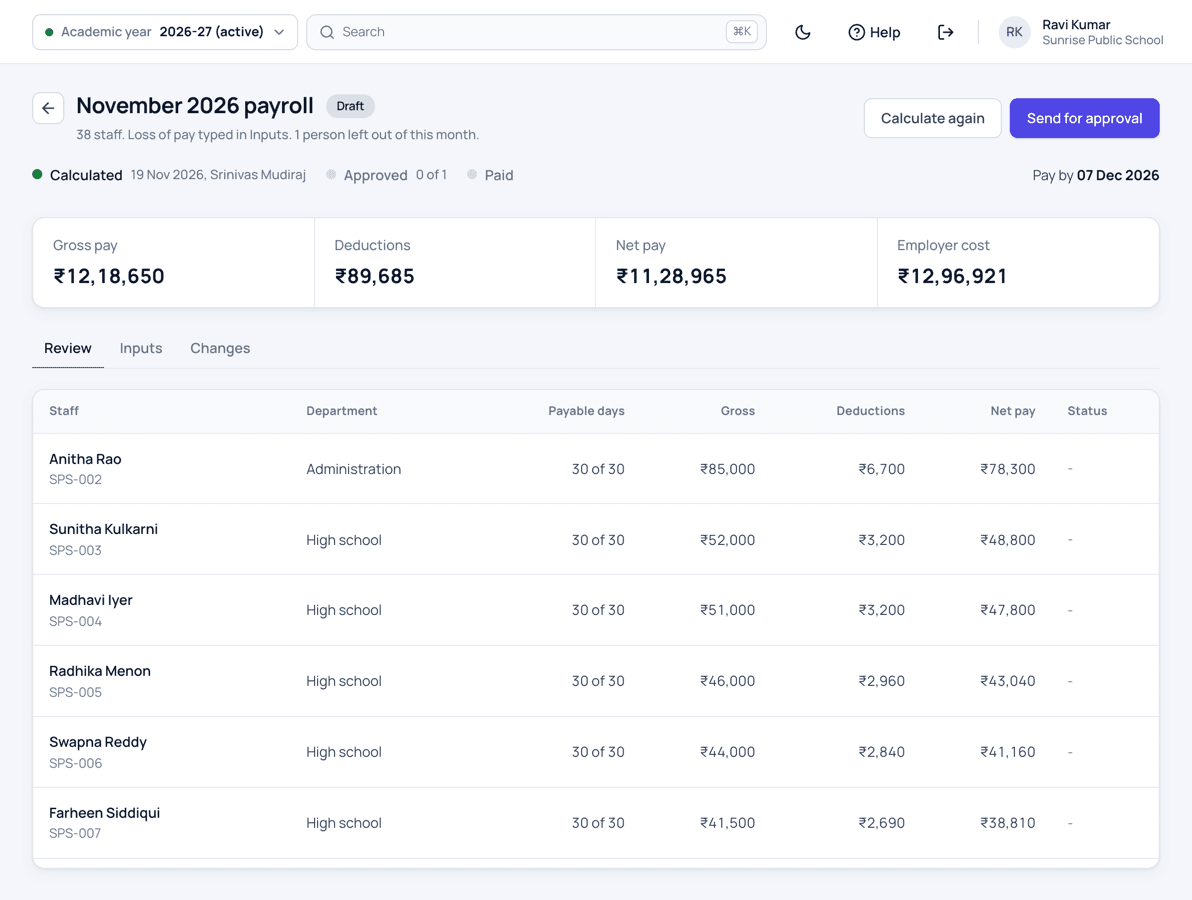
Patashala360 school payroll for November 2026 with gross pay, deductions, net pay and employer cost, and each staff member's payable days, gross, deductions and net pay
The month's salaries for every staff member, checked before the principal approves.

Payroll is one module of Patashala360, school management software for Indian schools. Loss of pay comes from the same staff attendance and staff leave the school already keeps, and salary payments reach the cash book and the Tally export without typing them again.

Payroll features

Salaries set up your way

  • Basic, DA, HRA, conveyance and special allowance, or one consolidated amount
  • Each part as a fixed amount, a percentage of other parts or of the gross, or the balance of the gross
  • Ready salary templates for teachers, office staff and support staff
  • A person's own amounts where they differ from the template
  • A bonus or arrears paid only in the months you choose
  • Guest and part-time teachers paid for the periods they teach
Payroll and payslips

PF, ESI, professional tax and TDS

  • PF at 12% on wages up to the EPFO limit, on the full wage, or as a fixed amount
  • ESI for staff within the ESI wage limit, with the school's share worked out too
  • Professional tax by your state's slabs, ready for Telangana, Andhra Pradesh, Karnataka, Maharashtra and West Bengal
  • TDS as a monthly amount or a percentage for each person
  • Labour welfare fund where your state asks for it
  • Your school's own values where they differ, shown beside the law's values
How to run monthly payroll in a school

Every month

  • Loss of pay taken from staff attendance, or typed for each person
  • One-time items such as a festival bonus or arrears
  • Every payslip line says how it was worked out, such as 12% of ₹19,000
  • Warnings for anything unusual before the month goes for approval
  • Staff who joined or left during the month paid for the days they worked
Staff attendance and biometric devices

Approval and control

  • The principal approves the month after seeing who is paid differently from last month and why
  • Nobody approves a month they prepared, and nobody changes their own salary
  • When the approver's own pay changed, their payslip waits for a second approver; everyone else is paid on time
  • A changed bank account is confirmed by a second person before any salary goes to it
  • An approved month stays as it is; corrections go into the next month

Paying salaries

  • One bank file for the month, in plain Excel or in your bank's own layout
  • Cash and cheque payments, and a salary paid in parts
  • A salary the bank returns is paid again later
  • Salary advances given and recovered from the monthly salary
  • Every payment in the cash book, the day close and the Tally export
School accounts and Tally

Payslips, challans and reports

  • Payslips with your logo, seal and signatures, on A4 or A5
  • Staff see their own payslip in the app, in English, Telugu and Hindi
  • PF ECR file for the EPFO portal and the ESI upload file
  • Professional tax and TDS registers for your CA
  • Salary register, yearly summary and each person's salary statement

How a month's salaries are paid

  1. Set up once

    Answer a few questions about PF, ESI, professional tax and TDS. The salary parts and templates are filled with the usual values, and you change only what is different for your school.

  2. Add each salary

    Give each person a template and a monthly gross, add their bank account, PAN and UAN, or upload everything from Excel.

  3. Prepare the month

    Loss of pay comes from staff attendance or is typed by the office. Add this month's bonus or arrears, calculate, and read the warnings.

  4. Approve

    The principal sees who is paid differently from last month and why, and approves the month.

  5. Pay

    Download one bank file and upload it on your bank's website, or pay in cash and by cheque. Staff see their payslips in the app.

  6. Pay the challans

    Pay PF, ESI and professional tax with the amounts shown for the month, record each challan, and download the files for the portals.

Who uses it

Accountant

Prepares the month, pays salaries and records the challans.

Principal

Approves the month and confirms changed bank accounts.

HR or office

Keeps salaries, bank accounts and advances up to date.

Correspondent

Sees every month's totals and approves when the principal's own pay changed.

School admin

Sets the salary parts, PF, ESI and payslip layout.

Every member of staff

Sees their own payslips in the app.

School payroll software: common questions

Does Patashala360 work out PF, ESI and professional tax?

Yes. The law's values come filled in. In Telangana, for example, professional tax is nil up to ₹15,000 a month, ₹150 up to ₹20,000 and ₹200 above that, and the slabs of other states are ready too.

Our school pays PF its own way. Is that possible?

Yes. PF can be on wages up to the EPFO limit, on the full wage, or a fixed amount such as ₹1,800, and some staff can be left out. Your school's value is shown beside the law's value, so the principal sees the difference when approving.

Can loss of pay come from the biometric attendance?

Yes. When the school uses staff attendance, the closed month gives each person's payable days and loss of pay. Without it, the office types the loss of pay days for each person.

How do we pay salaries through the bank?

Payroll makes one file for the month. Use the plain Excel file or set up your bank's own layout once from its sample file, upload it on the bank's website, and mark it paid with the bank's reference.

Does it file the PF and TDS returns?

No. It makes the PF ECR file and the ESI upload file for the government portals, and the professional tax and TDS registers that you or your CA use for the returns.

Can staff see their payslips?

Yes. Each member of staff sees their payslip in the Patashala360 app, in English, Telugu and Hindi, with every line explained, and can share it as a PDF.

Is payroll included in the price?

Yes. Every module is included in the same per-student price. We switch payroll on for your school when you are ready to use it.

See Patashala360 with your school's data

Tell us your school name, town and number of students. We will call you to fix a time for the demo.

Or write directly to hello@patashala360.com