Admissions & students

School admission management
software, from enquiry to joining

Track every admission enquiry from the first call to the day the child joins. Follow-ups, admission numbers and the admission fee are all in one place.

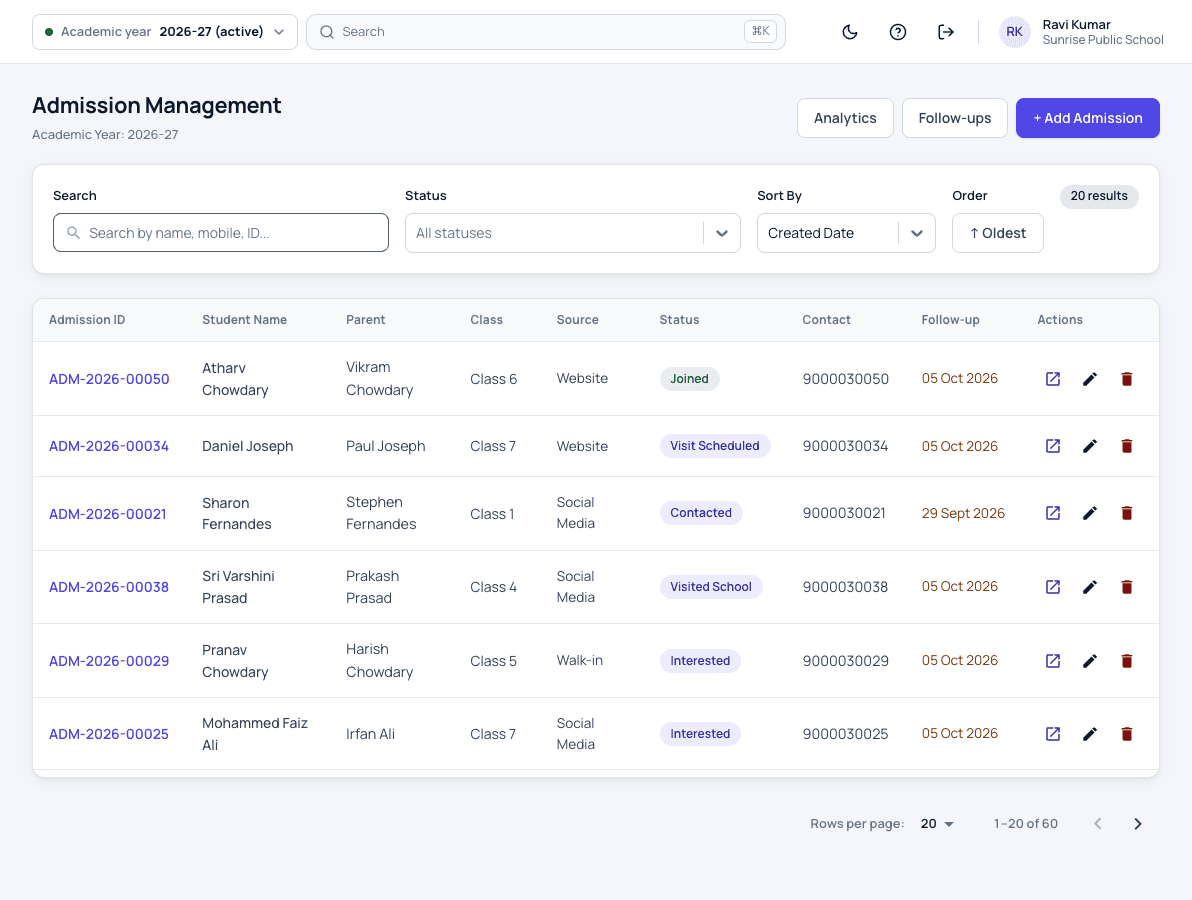
Admission enquiry management screen in Patashala360 school management software, listing enquiries with source, status and follow-up date
Every enquiry with its source, stage and next follow-up date.

Every school year starts with admissions. In Patashala360, school management software for Indian schools, a joined enquiry becomes a student record, gets an admission number and its first fees in the same school ERP, with nothing typed twice.

Admission features

Enquiries

  • Every enquiry with the child, the parent's mobile and the class sought
  • Where the family heard about you: walk-in, website, referral, social media or a field visit
  • Follow-up stages such as contacted, visit scheduled and fee pending, with comments
  • Photos and documents kept with the enquiry
  • A daily call-back list, so no family is forgotten

Admission

  • A family admitted straight from the enquiry
  • The child's record created without typing the details again
  • Admission numbers given in your own format, or typed by hand
  • A whole school brought in from Excel at the start
Excel data import

Fees from day one

  • A one-time admission fee charged only to new admissions
  • The class fees for the months the child actually attends
  • Concessions given at admission, within the school's limits
School fee management

Reports

  • Enquiries and joinings by source
  • How each member of the admission team is doing
  • Follow-ups due today
Student information

How an admission works

  1. Record the enquiry

    Note the child, the parent's mobile, the class sought and where the family heard about you.

  2. Follow up on time

    Move the enquiry through stages such as contacted, visit scheduled and documents pending, with a follow-up date and comments the whole team can read.

  3. Keep the papers

    Add photos of the documents the family brings, so they are ready on the day of admission.

  4. Admit in one step

    When the family joins, the enquiry becomes a student in the chosen class with an admission number.

  5. Fees from the first month

    The admission fee and the class fees reach the child's fee record, for the months the child attends.

Who uses it

Front office

Records every walk-in and call, and works through the call-back list each morning.

Admission team

Each enquiry is given to a member of the team, and their follow-ups are visible to the principal.

Principal

Admits families and sees which sources bring children who join.

Correspondent

Sees how many enquiries turn into admissions, and from where.

Admissions: common questions

Can we see which source brings the most admissions?

Yes. The admission report shows enquiries and joinings by source, so you know whether walk-ins, referrals, the website or field visits work best for your school.

Do we have to type the details again when a child joins?

No. A joined enquiry becomes a student in the class you choose, carrying the details already recorded.

Can several staff work on enquiries?

Yes. Each enquiry can be given to a member of the admission team, and their follow-ups and results are visible to the principal.

Is the admission fee charged to continuing students?

No. It is a one-time fee charged only to new admissions, including a child who joins from an enquiry.

Can we use our own admission number format?

Yes. Choose a prefix and numbers are given in order with no duplicates, or type admission numbers by hand.

See Patashala360 with your school's data

Tell us your school name, town and number of students. We will call you to fix a time for the demo.

Or write directly to hello@patashala360.com