Library management software
for schools

Run the school library in the same software as your school: the accession register, barcode labels, issue and return at the desk, reservations, fines on the fee record and stock checks.

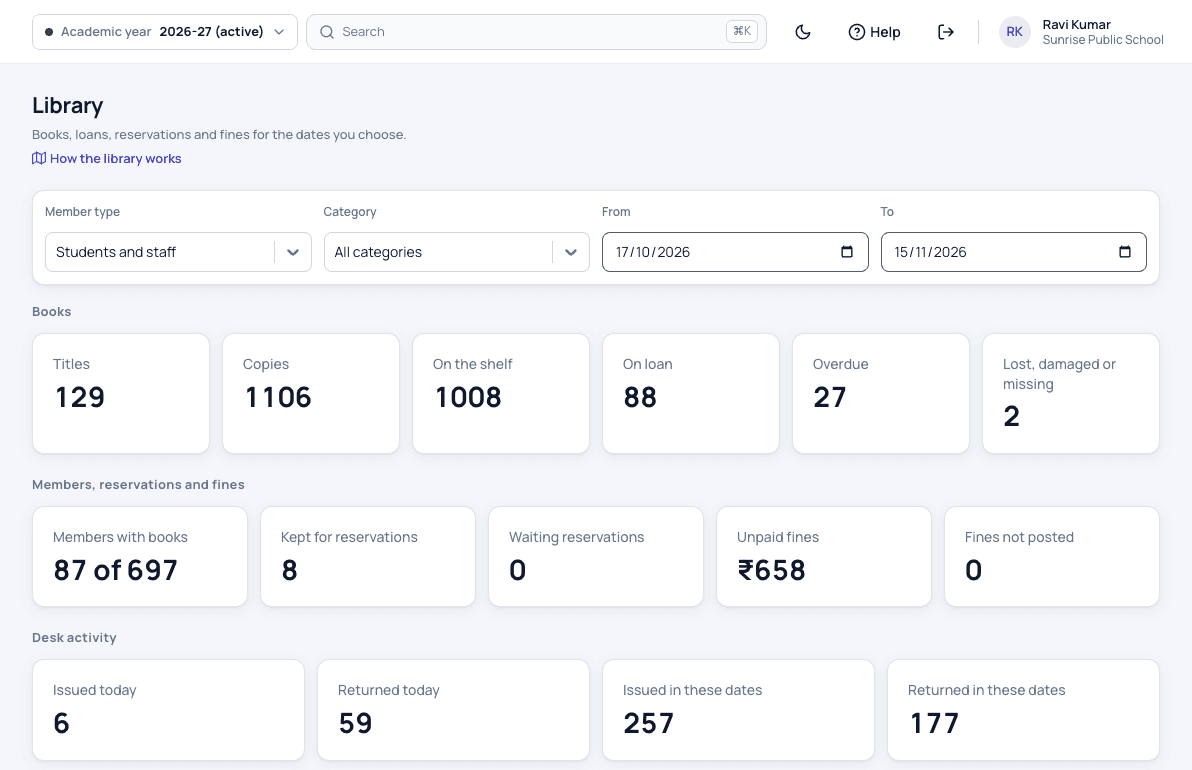
Patashala360 school library dashboard for Sunrise Public School with titles, copies, books on loan, overdue books, reservations and unpaid fines
Books, loans, overdue books and unpaid fines at a glance.

The library is one module of Patashala360, school management software for Indian schools. Every student and member of staff is a library member from the first day, and a student's fine goes on the same fee record as the school fees.

Library features

Books and the accession register

  • Books with authors, ISBN, category and class number
  • Copies with accession numbers, given in order or kept from your old register
  • Your old accession register brought in from Excel
  • A warning before the same book is added twice
  • Reference copies that are read in the library and never lent
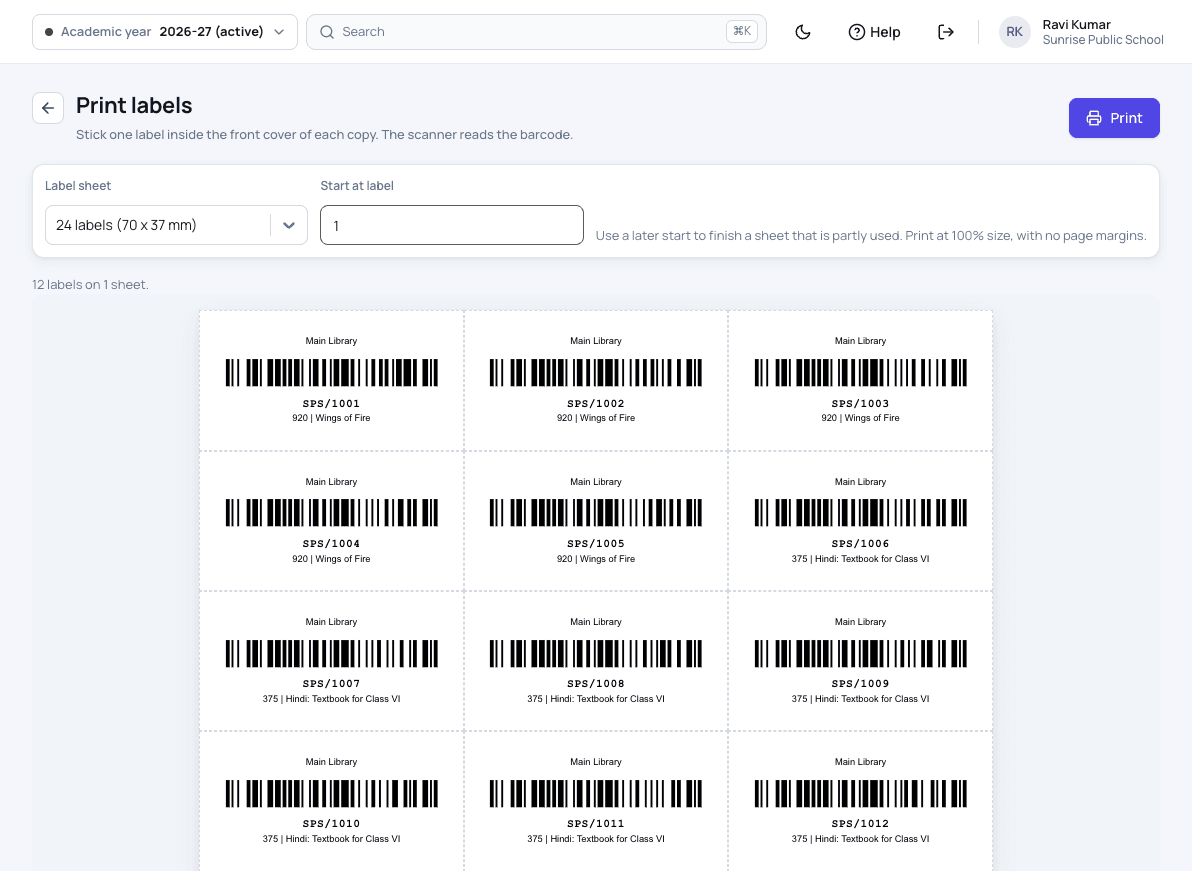
  • Barcode labels on A4 sheets of 24 or 40
Borrowing rules

  • Rules for each class group and for staff
  • Books at a time, loan days and renewals
  • Fine per day, grace days and a maximum fine
  • Lending stopped while fines are too high or a book is overdue, if you want
  • Rules that still work after students move up a class

The issue desk

  • Works with a USB barcode scanner
  • Up to 10 books issued to a reader in one go
  • Due dates that move off holidays by themselves
  • Returns with the book's condition, renewals and lost books
  • Reservations in a queue, with a returned copy kept for the next reader

Fines on the fee record

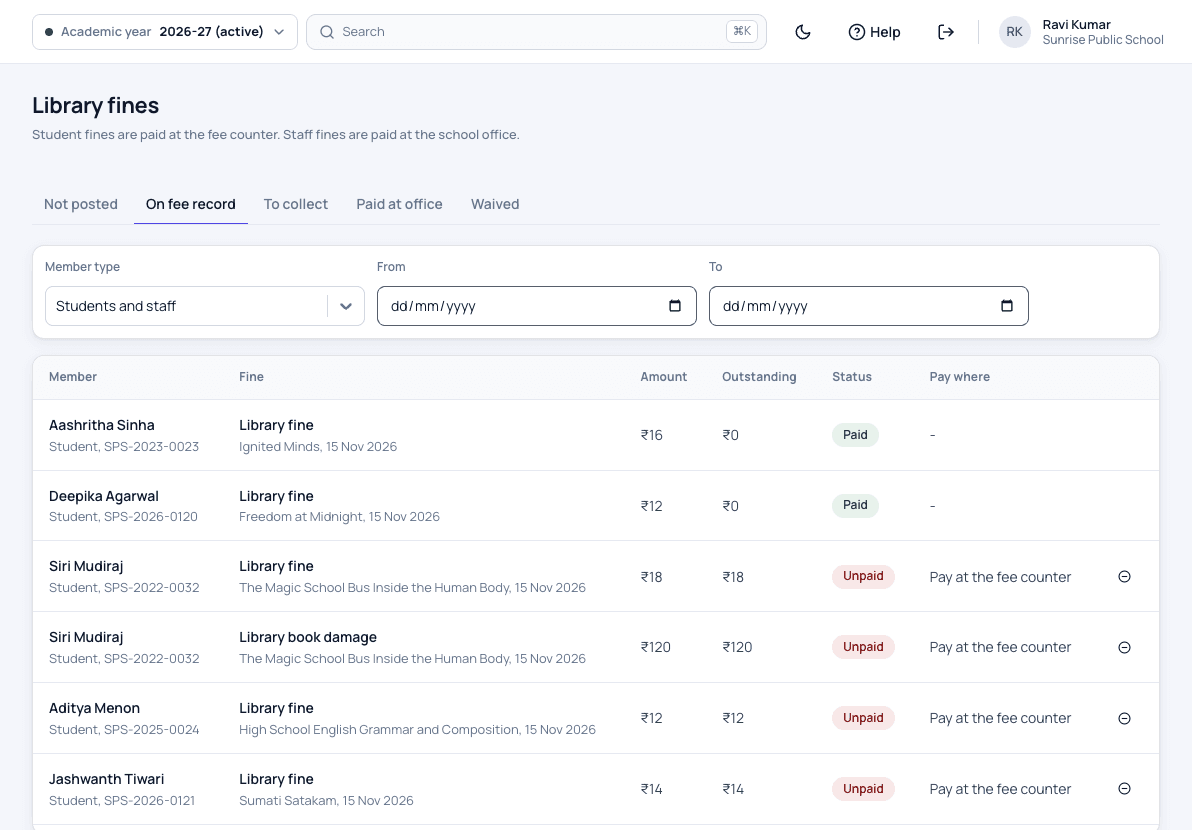
  • A student's fine added to their fee record, paid at the fee counter
  • The librarian never handles cash
  • Fines counted on school days only
  • A lost book charged at its price plus your lost-book fee
  • Waivers within a limit you set, with the reason kept
  • Staff fines paid at the office as other income
School fee management

Purchases, stock checks and reports

  • Book requests approved by the principal, then a purchase order
  • Books received in one delivery or several, numbered on arrival
  • Donations and specimen copies recorded with the giver's name
  • A stock check by scanning the shelves, with missing books listed
  • A library dashboard and 13 reports, downloaded to Excel

Families and staff, in the app

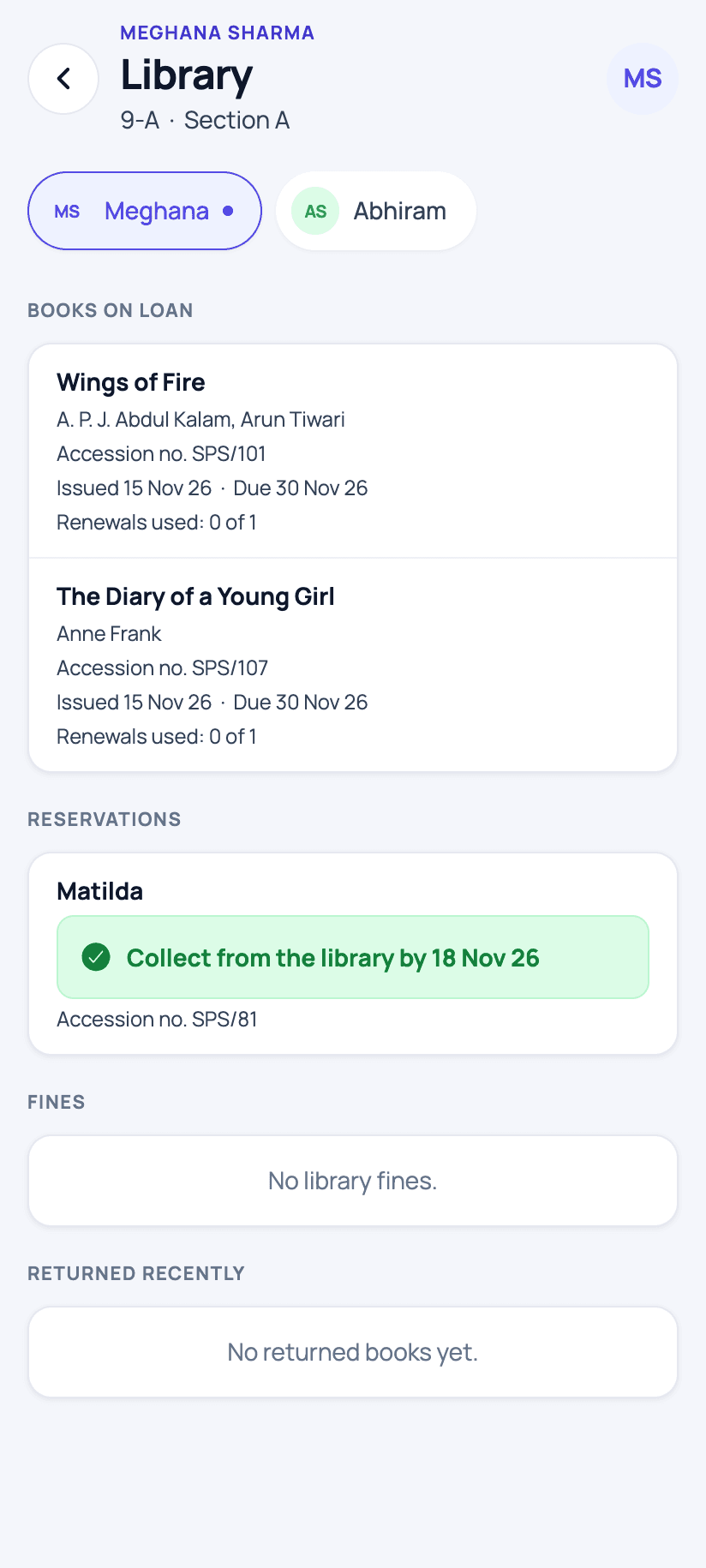
  • Parents see their child's books, due dates and fines
  • Alerts to parents when a book is issued, nearly due, overdue or ready to collect
  • Students and teachers search the catalogue and reserve books
  • In English, Telugu and Hindi
The parent app

How the library works

  1. Set up once

    Add your library, the borrowing rules for each class group and for staff, and the fine per day.

  2. Bring in your books

    Import the old accession register from Excel or add books, then print a barcode label for every copy.

  3. Issue at the desk

    The librarian scans the reader's code and the books. The due date moves off holidays by itself.

  4. Return and fine

    A late book's fine is counted on school days only and added to the student's fee record.

  5. Collect at the counter

    Parents pay the fine at the fee counter with the other fees, and it shows on the receipt.

  6. Check the shelves

    Scan every shelf once a year. The books not found are listed for you to look for again.

Who uses it

Librarian

Issues and returns books, adds new books and runs the stock check.

Principal

Approves book purchases, can waive any fine and reads the library reports.

Fee counter

Collects library fines with the school fees, on the same receipt.

Teachers

Borrow books, and search and reserve them in the app.

Students

Search the catalogue and reserve books in the app.

Parents

See their child's books, due dates and fines in the app.

School library software screens

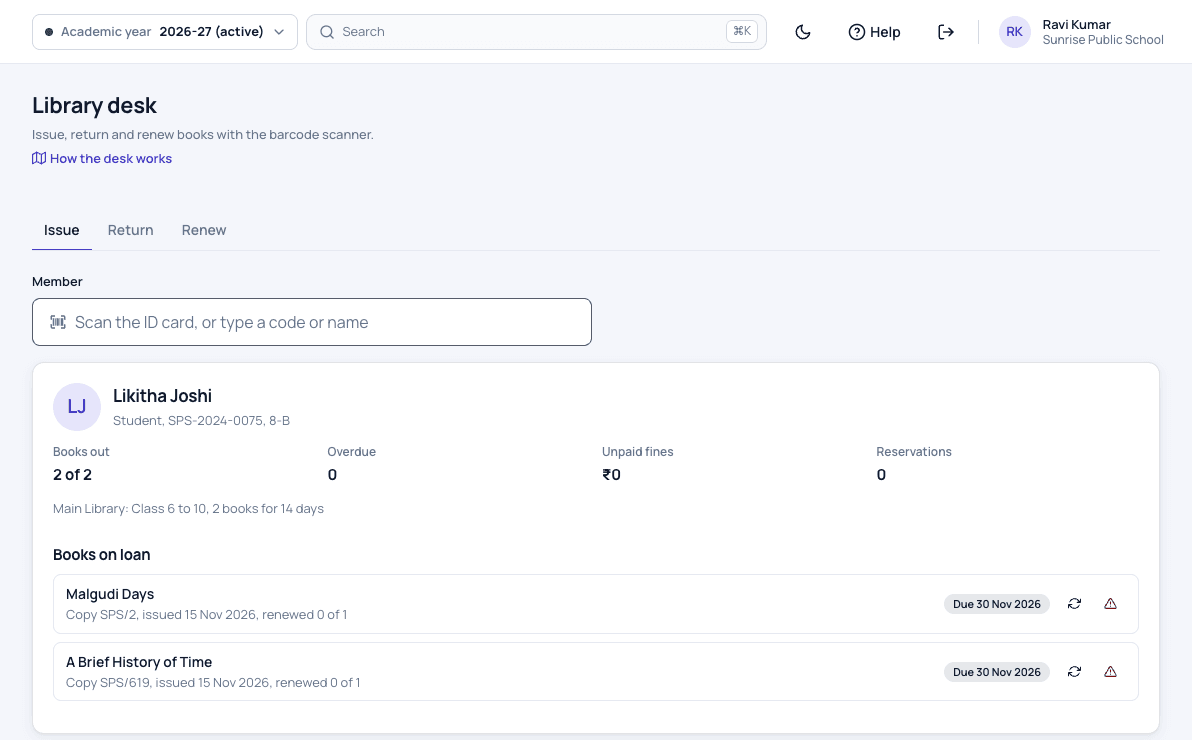
Patashala360 library issue desk showing a Class 8 student's card with two books on loan and their due dates
Scan the reader's code, scan the books, and the due dates are set.
Patashala360 sheet of library barcode labels, each with the library name, accession number, class number and book title
Barcode labels with the accession number, printed on A4 sheets.
Patashala360 library fines on students' fee records, with paid and unpaid fines to be paid at the fee counter
Fines go on the fee record and are paid at the fee counter.
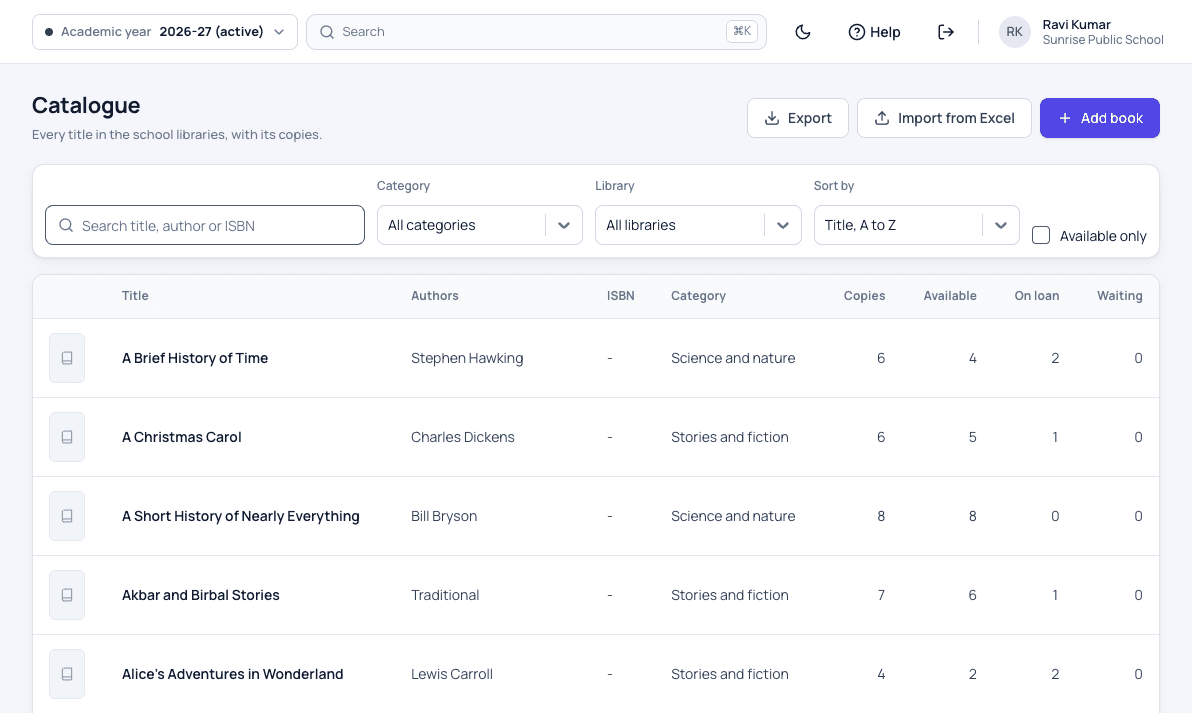
Patashala360 library catalogue listing titles with authors, category, copies, copies on the shelf, on loan and readers waiting
Every title with its copies, what is on the shelf and who is waiting.
Patashala360 parent app library screen with a child's books on loan, due dates and a reserved book ready to collect
Parents see books, due dates and reservations in the app.

School library software: common questions

Do we need special hardware for the library?

No. You need a USB barcode scanner at the library desk, which types the code like a keyboard, and A4 label paper with 24 or 40 labels a sheet.

Can we bring in our old accession register?

Yes. Fill the Excel template with one row per copy and upload it. Your old accession numbers stay as they are, and new copies carry on after the highest number.

How are library fines collected?

A student's fine is added to the fee record as a charge, due 7 days later, and parents pay it at the fee counter with the other fees. The librarian never takes cash. A staff member's fine is paid at the school office.

Are holidays counted in the fine?

No. Only school days after the due date count, and a due date that falls on a holiday moves to the next school day.

Can parents see what their child has borrowed?

Yes. In the Patashala360 app, parents see their child's books, due dates, reservations and fines, and get an alert when a book is issued, nearly due or overdue.

What happens when a student leaves with a book still out?

When the office marks a student as left, it is warned about books not returned and fines not paid. A student who has left can still return books and pay fines, but cannot borrow.

Is the library included in the price?

Yes. Every module is included in the same per-student price. We switch the library on for your school when you are ready to use it.

See Patashala360 with your school's data

Tell us your school name, town and number of students. We will call you to fix a time for the demo.

Or write directly to hello@patashala360.com