
Staff & administration
Payroll and payslips for schools
Monthly salaries with PF, ESI, professional tax and TDS, approved by the principal and paid by bank file or cash, with payslips in the app.
Payroll and payslips features
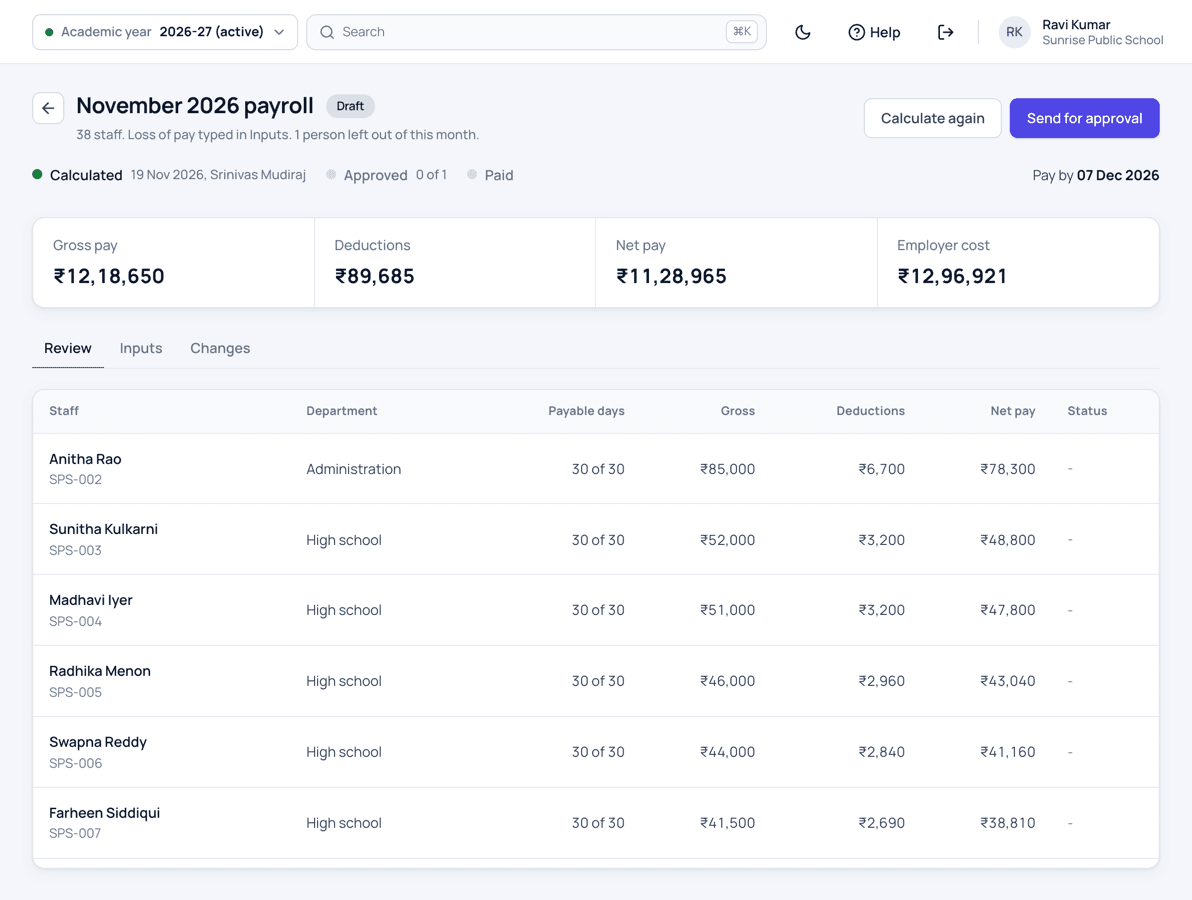
Set up each salary part once, such as basic, DA, HRA and special allowance, with PF, ESI, professional tax and TDS filled in with the law's values. Each month payroll takes loss of pay from staff attendance or as typed by the office, adds this month's items such as a festival bonus, and shows how every line of every payslip was worked out. The principal approves the month after seeing who is paid differently from last month and why. The accountant pays by one bank file or in cash, and the payments reach the cash book, the day close and Tally. Staff see their own payslip in the app.
This module is part of Patashala360, school management software for Indian schools. It works on the same records as the other school ERP modules, so the office never types the same detail twice.
- Basic, DA, HRA and allowances as fixed amounts, percentages or the balance of the gross
- PF, ESI, professional tax, LWF and TDS with the law's values, which your school can change
- Loss of pay from staff attendance, or typed for each person
- Bonus or arrears in chosen months, and one-time items for a month
- Every payslip line shows how it was worked out
- Principal approval, with every change since last month listed
- One bank file for many staff, or cash and cheque, with part payments
- Salary advances recovered from the monthly salary
- PF ECR and ESI upload files, PT and TDS registers
- Payslips with your logo, seal and signatures
- Salary payments in the cash book, day close and Tally
- Each member of staff sees their payslip in the app
How it works
-
Set up once
A short setup fills the salary parts, PF, ESI, professional tax and TDS with the usual values. Add each person's salary and bank account, one by one or from Excel.
-
Prepare the month
Loss of pay comes from staff attendance or is typed by the office. Add this month's items such as a festival bonus, then calculate and read the warnings.
-
Approve
The principal sees who is paid differently from last month and why, and approves. Nobody approves a month they prepared or changed.
-
Pay
Pay by one bank file for the month, or in cash and by cheque. Record the PF, ESI and professional tax challans, and staff see their payslip in the app.
Payroll and payslips: common questions
Do we have to follow the law's PF and ESI values?
The law's values come filled in. Your school can use its own, such as PF on a lower wage limit or a fixed amount, and the different value is shown beside the law's value for the approver.
Can the bank pay every salary from one file?
Yes. Payroll makes one file for the month, in plain Excel or in your bank's own layout, set up once from the bank's sample file. Upload it on your bank's website, then mark it paid with the bank's reference.
Does it file PF and TDS returns?
No. It makes the PF ECR file and the ESI upload file for the government portals, and the professional tax and TDS registers for your CA.
Can staff see their payslip?
Yes. Each member of staff sees their payslip in the Patashala360 app, in English, Telugu and Hindi, and can share it as a PDF.
Related school ERP modules
Roles & permissions
28 ready-made roles, from correspondent to warden, so each person sees only what their job needs.
Staff roles and access control for schoolsNotices & announcements
Post a notice once, and it reaches exactly the people it is meant for.
School notice board and announcementsAutomatic numbering
Admission numbers, roll numbers and employee codes given automatically, in your school's own format.
Admission and roll number generatorAll 40+ modules come in one price. Before you choose any school ERP, read how to choose the best school management software in India.
See Patashala360 with your school's data
Tell us your school name, town and number of students. We will call you to fix a time for the demo.
Or write directly to hello@patashala360.com