Academics

Student attendance management
software for schools

Patashala360 is school attendance management software for Indian schools. Class teachers mark the daily register in a few minutes, the monthly register adds itself up, and every correction is recorded, so the principal and the office can trust the record.

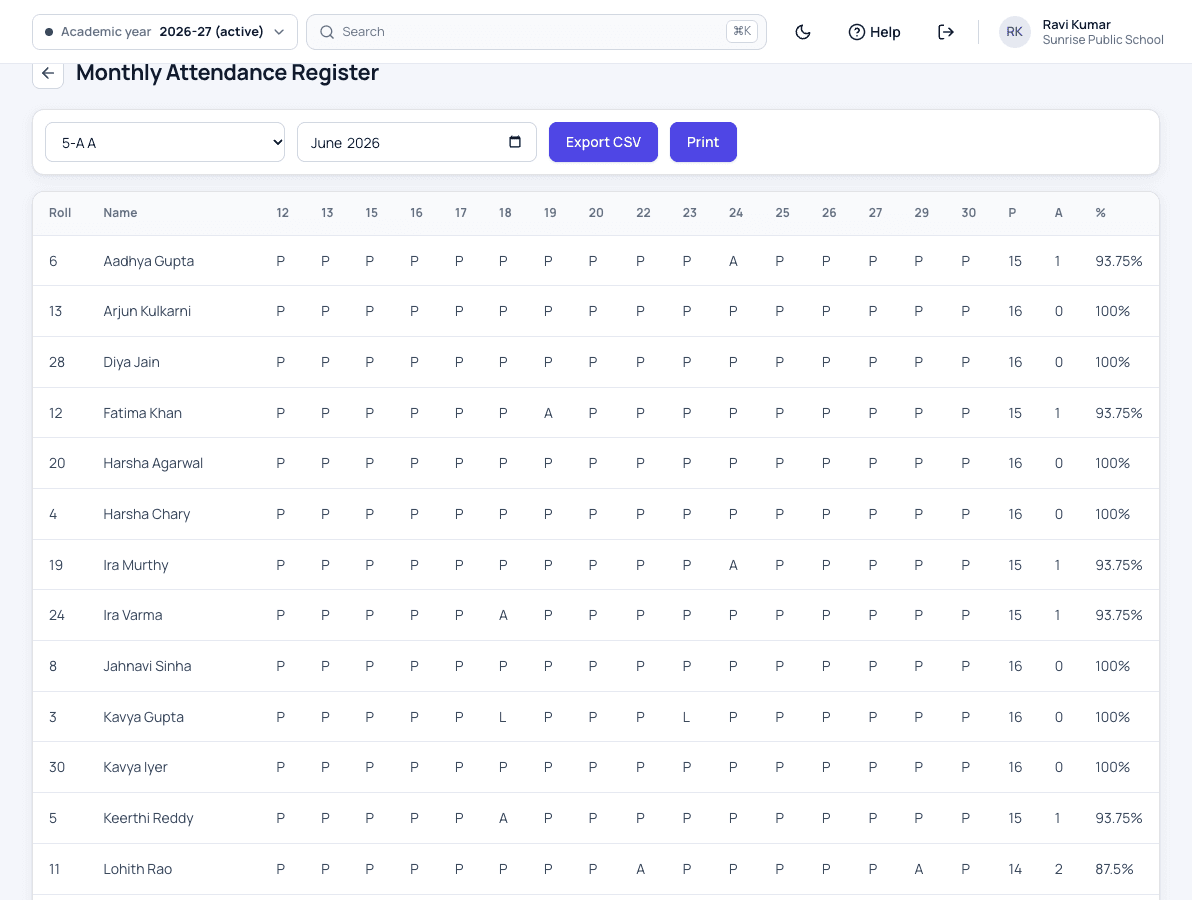
Patashala360 monthly attendance register for class 5-A with a mark for each school day and present, absent and percentage totals
The class register for the month, ready to print.

Attendance is one module of Patashala360, school management software for Indian schools. The register uses the same class lists as exams and the timetable, and the school calendar decides which days count, all in one school ERP.

Attendance features

The daily register

  • Marked by the class teacher from the current class list
  • An in-charge teacher marks it on the class teacher's leave days
  • Present, absent, late or on leave
  • Holidays and Sundays blocked unless a senior member of staff allows it
  • Opening attendance for students who join in the middle of the year

Corrections and reports

  • Every correction recorded, never hidden
  • The monthly register with totals and percentage
  • A full-year attendance report for every student
  • Today's attendance figures on the dashboard

Families

  • Parents send leave notes from the app, once it launches
  • Parents see each day's attendance in the app, once it launches
  • Absence alerts to parents in the app, not by SMS, once it launches
The parent app

Other registers in the same software

  • Roll call in the hostel by the warden
  • Exam-hall attendance by the invigilator, in the app, once it launches
  • The bus boarding list kept by the attendant, in the app, once it launches
Hostel roll call

How attendance works

  1. Open the class

    The class teacher opens today's register for their own class. Children who have left or moved section are not on it.

  2. Read the leave notes

    Leave notes that parents send from the app, once it launches wait for the class teacher before the register is marked.

  3. Mark in a few taps

    Mark each child present, absent, late or on leave, in any web browser today, or in the app, once it launches.

  4. The office sees today's figures

    The dashboard shows today's attendance across the school as registers are marked.

  5. Month end adds itself up

    The monthly register shows each child's presents, absents and percentage, with no counting by hand.

Who uses it

Class teacher

Marks the daily register for their own class and reads the parents' leave notes.

Principal

Sees today's attendance across the school and each class's monthly register.

Office

Prints the monthly register and answers a parent's question with the record.

Parents

See their child's attendance and get absence alerts in the app, once it launches.

Attendance: common questions

Can teachers mark attendance on their phones?

Yes, in the Patashala360 app for teachers. Launching soon on Android and iPhone. On a computer, the register works in any web browser today.

Can a register be changed after it is marked?

Yes, by someone allowed to do it, and every change is recorded with who made it and when.

What happens on holidays?

The register follows the school calendar. Holidays and Sundays cannot be marked unless a senior member of staff allows it.

Are parents told when a child is absent?

Yes, through an alert in the Patashala360 app, not by SMS. Launching soon on Android and iPhone.

What about a child who joins in the middle of the year?

The office records the attendance the child already has as an opening figure, so the year's percentage comes out right.

See Patashala360 with your school's data

Tell us your school name, town and number of students. We will call you to fix a time for the demo.

Or write directly to hello@patashala360.com