
Many trusts and societies in India run two, three or more schools. Each branch has its own principal, fee counter and registers, and the owner can no longer walk into one office to see how things are going. The work changes from running a school to keeping several schools on track. This guide covers the habits that help, and it works whichever software your schools use.
1. Keep each school's records separate
Each branch should keep its own students, fee receipts, staff, attendance registers and receipt numbers. Records that are mixed make audits, fee certificates and admissions harder, and a mistake in one school can spread to another. Separate records also mean each principal is clearly responsible for their own school.
2. Decide the few numbers you look at every day
A short list, read at the same time every morning, tells you more than a long report read once a month:
- Students on the roll in each school.
- Fees collected today.
- Fees still due for the year.
- Students present today, and staff present.
A school whose registers are not marked by mid-morning, or whose fee collection suddenly drops, needs a call that day, not at the next review meeting.
3. Give group staff one sign-in, with the right role in each school
A director or a group accountant should not juggle a separate login for every school. One sign-in should not mean full access everywhere, though. Give each person a role in each school that matches their work there: a director may act as Principal in every branch, while a group accountant works only in fees and accounts.
4. Tell each branch who can open its records
The people who run each branch should know who from the group can open their school's records, and with which role. Share the list at the start of the year and again whenever it changes. It avoids surprises for the branch staff.
5. Remove access the day someone leaves
When a director, accountant or coordinator leaves the trust, remove their access to every school on the same day. Keep the receipts and records they made under their name, so the history stays clear.
6. Use the same standards in every branch
Agree on common fee head names, class and section names, admission number formats and receipt formats. When every branch uses the same names, the trust can read reports from different schools side by side without asking what each line means.
7. Bill and pay centrally, but keep each school's invoice
Ask vendors to address each school's invoice to the trust with the trust's GST details, and to send one combined bill for all the schools. The trust pays once, and each school still has its own invoice for its records.
8. Visit with the numbers in hand
Use the daily figures to plan visits. Go first to the branch with the most dues or the lowest attendance, and talk through the numbers with the principal. A visit backed by figures is more useful to both sides than a general inspection.
How Patashala360 helps
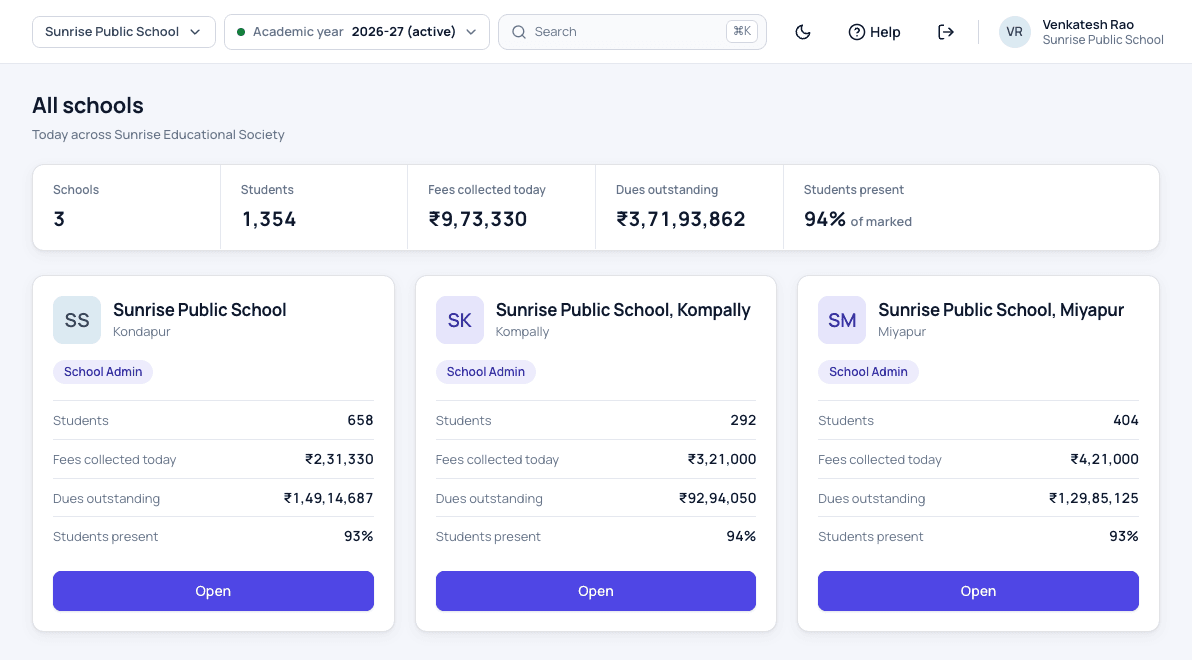
In Patashala360, each school of a group keeps its own records, while the owner and the people the owner adds sign in once. The all-schools page shows students, fees collected today, dues and attendance for every branch, with totals at the top, and any school opens without signing out. Each person gets a role in each school, and removing a person ends their access everywhere at once.
When the trust is billed for all its schools, each school's invoice is addressed to the trust and a combined bill is paid with one payment. Read more about our multi-school management software, or see how each school handles fees and dues.
Patashala360 is school management software built for schools in India. If you are comparing options, read how to choose the best school ERP in India.