
A school timetable has many parts that depend on each other: classes, teachers, subjects, rooms and the periods in a week. Most clashes come from placing things in the wrong order. This guide shows academic coordinators how to make a school timetable without clashes, step by step.
1. Fix the days and periods first
Before any subject is placed, agree the shape of the week. Write down the working days, the periods in each day, and when each period starts and ends. Mark the assembly time, the breaks and lunch. If one day is shorter than the others, note it now. Every later step depends on this grid, so agree it with the principal before you start, and do not change it halfway.
2. List each teacher's subjects and load
Next, collect the facts the timetable must fit. Do this on paper or in Excel before you place a single period.
- For each class, the subjects it studies and the periods each subject needs in a week.
- For each teacher, the classes and subjects they teach, and their total periods in a week.
- The days or periods when a teacher is not available, such as a part-time teacher's days off.
- The rooms that only some subjects can use, such as the science labs, the computer lab and the ground.
Add up each class's periods and check that they match the periods in the week. Then add up each teacher's load and compare it with the periods they are free to teach. If a teacher has more periods than they can teach, no timetable will fit. Share the subject with another teacher now, not after the term starts.
3. Place the fixed items first
Some periods have only one possible place, or very few. Put them on the grid before anything else:
- Assembly and any period the whole school shares.
- Games and physical education, which need the ground and the games teacher.
- Lab periods, which need the lab to be free.
- Double periods for practicals, art or project work, which need periods back to back.
- Periods where several sections are taught together, such as a second language group.
4. Fill the hardest classes and the busiest teachers first
With the fixed items in place, start with the parts that are hardest to place. That usually means senior classes with many subjects, and teachers who teach in many classes. A busy teacher has few free periods, so each placement narrows the choice. Leave them for the end and you may find that every period they are free is already filled. For example, if one teacher takes physics in every senior section, place those periods before any junior class. Lighter classes and subjects with few periods can fill the gaps afterwards.
5. Check every teacher and room for clashes
A clash is one teacher, one room or one class in two places in the same period. Check every period of every day in these ways:
- By teacher: is any teacher in two classes at the same time?
- By room: does any lab, hall or ground have two classes at once?
- By class: does any class have two subjects, or no teacher, in the same period?
Check again after every change. A change made to fix one clash often creates another one somewhere else in the week.
6. Balance each subject across the week
A timetable can be free of clashes and still be hard to teach. Look at each class's week as a whole. Spread each subject across the days, so a class does not have mathematics again and again on Monday and none on Thursday. Where you can, keep subjects that need close attention, such as mathematics and science, in the morning, and avoid giving the same subject the last period every day. Then look at each teacher's week the same way, so nobody has a day with no free period followed by a nearly empty one.
7. Plan covers for an absent teacher on the day
Even a good timetable meets a teacher who is ill on the day. Each morning, find out which teachers are away, then give each of their periods to a teacher who is free at that time. Agree a simple order for who covers, such as a teacher of the same subject first, then any free teacher, then the vice principal. Tell each covering teacher early in the day which class, period and room they have, and what the class should work on. Keep a record of covers, so the extra work is shared fairly over the term. When leave is planned in advance, arrange the covers before the day.
8. Publish, then change carefully
Share the final timetable with teachers, students and parents before the term starts. Changes in the middle of the year confuse children and families, so make them only for a real reason, such as a new teacher or a new section. Keep one master timetable and make every change there first, so the printed copies on notice boards and in staff rooms never disagree with it. Before you change anything, check the change for clashes again. Tell everyone affected on the same day, and keep a copy of the earlier version so you can see what moved.
How Patashala360 helps
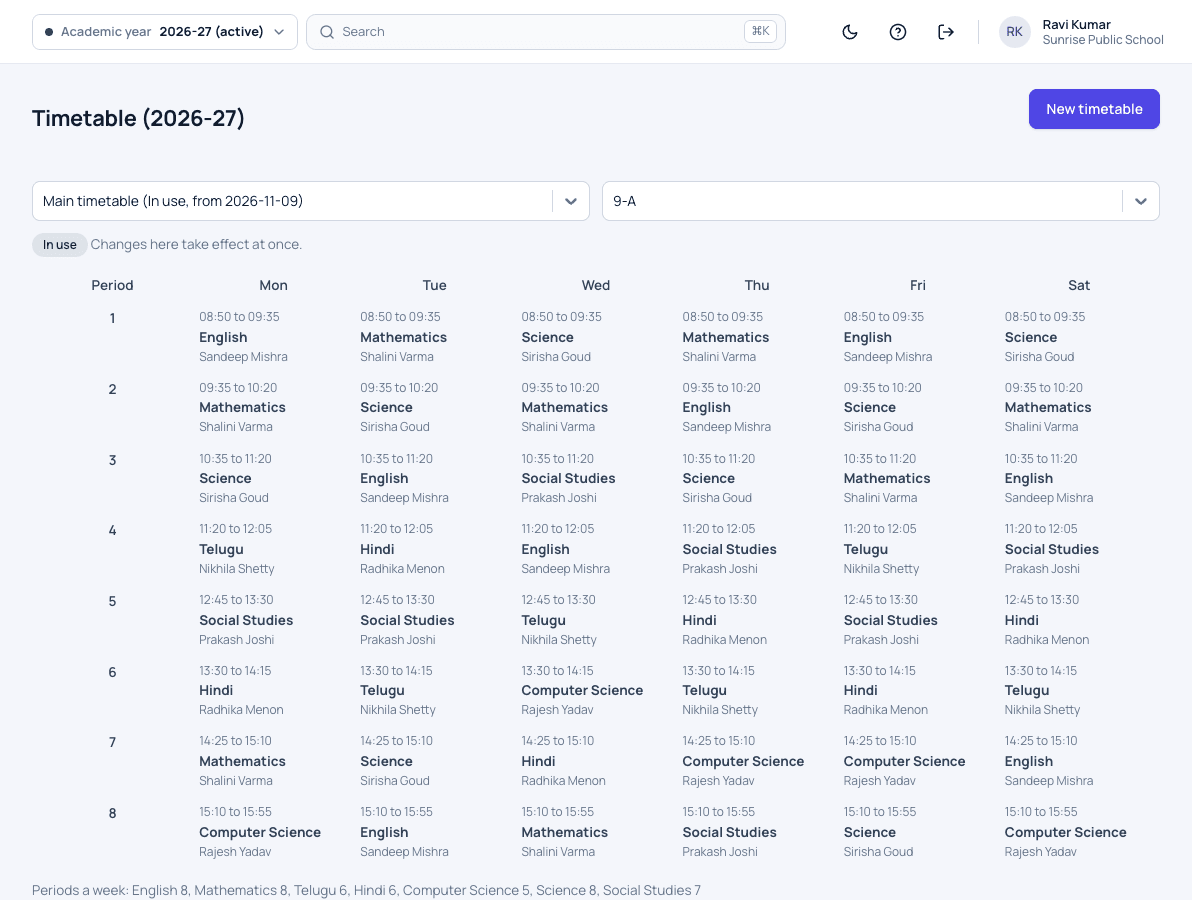
In Patashala360, the school's days and periods are set once. The coordinator then builds each class's timetable period by period, and every change is checked for clashes before it is saved. Changes take effect at once. When a teacher is away, each of their lessons can be covered by any member of staff. Teachers see their day plan, and families see their child's timetable, in the Patashala360 app, once it launches.
See our school timetable software and how staff leave works in Patashala360.
Patashala360 is school management software built for schools in India. If you are comparing options, read how to choose the best school management software in India.