
Academics
Class & Section Management for Schools
Set up your classes and sections once a year, each with its own class teacher.
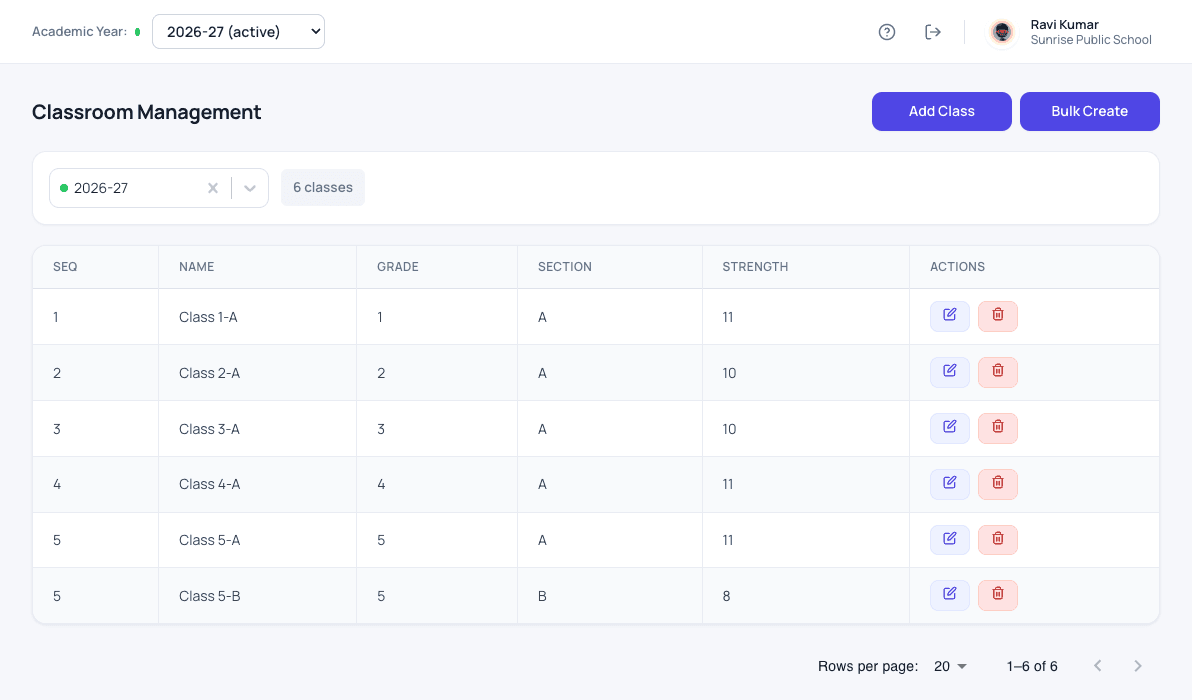
What classes & sections does for your school
Classes and sections are set up for each academic year. Each class can have a class teacher, and when that teacher is on leave the office names an in-charge teacher for those days. If a student moves section during the year, the date of the move is kept, so past registers still show the right class.
- Classes and sections for each academic year
- A class teacher for each class
- An in-charge teacher for the days the class teacher is on leave
- Section changes during the year, with the date kept
- Roll numbers given automatically within each class
How it works
Classes & sections in three steps
-
Create the year's classes
Add classes one by one or create a whole set at once for the new academic year.
-
Name the class teachers
Give each class its class teacher, and an in-charge teacher for the days they are on leave.
-
Keep sections right
Move a student between sections during the year; the date is kept, so past registers stay correct.
What changes
What your school gets from it
- The year's class structure is ready in minutes, not days.
- Attendance and marks always go to the right class teacher.
- Class strength is visible at a glance.
Questions
Classes & sections: common questions
Can we create all classes at once?
Yes. Bulk create sets up a full range of classes and sections for the academic year in one step.
What happens when a class teacher is on leave?
The office names an in-charge teacher for those days, who marks the register without sharing anyone's login.
Works together with
Subjects & teachers
Keep the subject list for every class, and know which teacher handles each one.
Subject & Teacher Allocation for SchoolsStudent attendance
Daily attendance in a few taps, with a clear record for every student across the year.
Student Attendance Management SystemHomework
Teachers set homework, students submit it, and teachers reply with feedback.
Homework Management Software for SchoolsClasses & sections is one of 24 modules ready today in Patashala360, school management software built for schools in India. Every module works on the same student, class and fee records, so nothing is typed twice. If you are comparing options, read how to choose the best school management software in India.
Ready to see it on your own school's data?
Send us your school name, your city and roughly how many students you have. We will set up a walkthrough with your numbers in it, not a generic slide deck.
Or write directly to hello@patashala360.com