
Staff & administration
School dashboards, reports and Excel export
Student, staff and fee figures for the correspondent and principal on one screen.
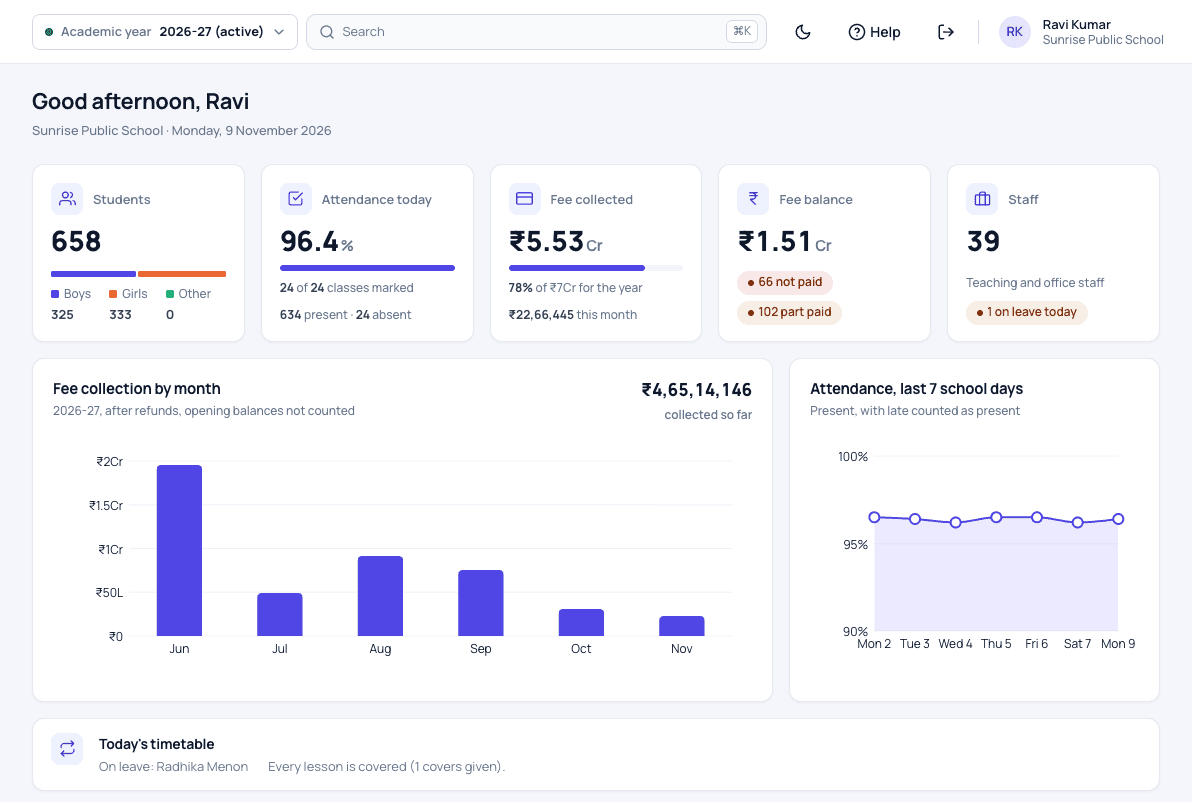
Dashboards and reports features
Each person lands on a dashboard made for their role, with student and staff counts, today's attendance and the year's fee collection trend. Your school's records can be downloaded to Excel at any time, because the data belongs to the school.
This module is part of Patashala360, school management software for Indian schools. It works on the same records as the other school ERP modules, so the office never types the same detail twice.
- A dashboard for each role
- Student and staff counts and today's attendance at a glance
- The year's fee collection trend
- Your school's records downloaded to Excel: students, parents, staff, fees, attendance and marks
- Your data, available to you whenever you want it
How it works
-
Land on your dashboard
Each person opens a dashboard made for their role, with shortcuts to their daily work.
-
See the school at a glance
Student and staff counts, today's attendance, fees collected and still due, and the monthly collection trend.
-
Take your data
Download your school's records to Excel at any time: students, parents, staff, fees, attendance and marks.
Dashboards and reports: common questions
Can we download our school's records?
Yes. The administrator can download students, parents, staff, fees, attendance, marks, transport and more to Excel at any time.
Does every role see the same dashboard?
No. Each role sees the figures and shortcuts that match its work.
Related school ERP modules
Staff management
Teaching and non-teaching staff, their roles, and their own secure logins.
Staff management software for schoolsStaff leave
Staff ask for leave, the right person approves it, and the absent teacher's lessons are covered.
Staff leave management for schoolsRoles & permissions
28 ready-made roles, from correspondent to warden, so each person sees only what their job needs.
Staff roles and access control for schoolsAll 30 modules come in one price. Before you choose any school ERP, read how to choose the best school management software in India.
See Patashala360 with your school's data
Tell us your school name, town and number of students. We will call you to fix a time for the demo.
Or write directly to hello@patashala360.com